Custom structured data (JSON-LD) for your posts
paid plans
Structured data is a way of labeling your content so search engines and AI tools can understand it more precisely, not just read it. beehiiv now lets you add custom structured data to individual posts, no code required, so your recipes, events, FAQs, reviews, and more can be understood and cited more accurately by both classic search engines and AI answer engines like ChatGPT, Perplexity, and Google AI Overviews.
Key terms
A few terms come up throughout this article, including some acronyms you may have seen elsewhere. Here's what they mean before you dive in:
- Structured data (also called schema markup): a standardized way of describing your page's content using the shared vocabulary at schema.org, so search engines and AI tools can understand it precisely instead of just reading it. It's delivered on the page as JSON-LD, a small block of code that sits alongside your visible content.
- AEO (Answer Engine Optimization): the practice of making content easier for AI answer engines, like ChatGPT, Perplexity, and Google AI Overviews, to find, understand, and cite accurately.
- GEO (Generative Engine Optimization): another common name for the same practice as AEO. The two terms are often used interchangeably.
- AEO settings: the section in beehiiv's post editor (on the Web page of the post flow) where you add custom structured data to a post.
What AEO settings are, and what beehiiv already gives you
AEO settings is the section in your post editor where you add custom structured data (also called schema markup) to a post. Structured data is a standardized way of describing a page's content using the shared vocabulary at schema.org. It's delivered on your page as JSON-LD, a small block of code that search engines and AI crawlers read alongside your visible content.
Every beehiiv web post already includes baseline structured data automatically, with nothing to set up in AEO settings. beehiiv generates this from the post's real content, including the title, subtitle, author, publisher, publish date, and thumbnail image, along with breadcrumb markup that shows the post's place in your site. You don't need to do anything to get this baseline coverage; it's on by default for every post.
AEO settings is where you go further: attach additional, more specific schema types (like Recipe, Event, or FAQ) to a post on top of that baseline, using a guided form in the post editor.
Where to structured data settings
- Open the post you want to edit, or start a new draft, and go to the Web tab in the post editor.
- Scroll to the SEO settings section, below your meta title, description, and social preview fields. For more on those settings, read Options on the web page of the post flow. Underneath, you’ll see the AEO Settings section.
How to add structured data to a post
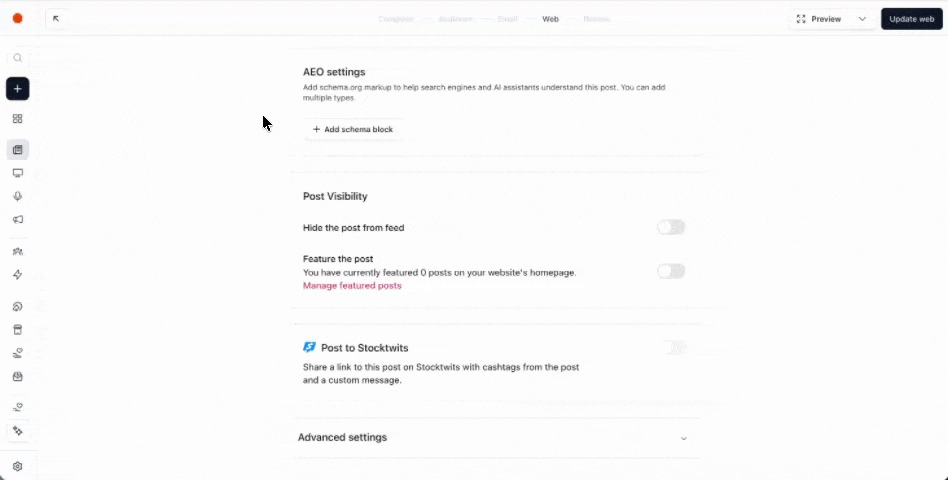
- From the AEO settings section, click on the + Add Schema block button.
- Use the dropdown to choose a schema type from the dropdown. The form will only show the fields relevant to that type. For example, choosing Event will show a toggle for online vs. in-person, then reveal the matching fields.
- Fill in the fields for your chosen type.
- Add another block if you want to combine types on the same post, for example a Recipe plus an FAQ. You can add up to 5 structured data blocks per post, and each schema type can only be used once per post (so you could add one Recipe and one FAQ, but not two Recipe blocks).
- Publish or update your post. beehiiv builds the structured data automatically, and it appears on your live post page once published.
Leaving a field blank doesn't cause an error; it's simply left out of the structured data beehiiv generates for that block. beehiiv will stop you from saving if any of the following happen:
- You add more than 5 blocks to a post.
- You select an unsupported schema type.
- A list field (like questions, ingredients, or steps) has more than 5 entries.
- The same schema type is used twice on one post.
- A Review rating falls outside the 1 to 5 range.
Supported schema types
| Type | What it's for | Fields you fill in |
| FAQ | Highlight question-and-answer content in search results | Up to 5 questions and answers |
| Video | Describe a video included in your post | Name, thumbnail image, upload date |
| Event | Promote an online or in-person event | Name, start date and time, and either an event URL (online) or a venue name and address (in-person) |
| Recipe | Mark up a recipe | Name, image, up to 5 ingredients, up to 5 instructions |
| Review | Mark up a review of an item | Item name, rating (1 to 5), author |
| Product | Mark up a product | Name, price (USD) |
| Course | Mark up a course | Name, description, provider name |
| How-to | Mark up step-by-step instructions | Name, up to 5 steps |
| Software app | Mark up a software application | Name, application category, operating system, price |
| Article (override) | Override or supplement the post's automatically generated article markup | See 'How this works with your post's existing article markup' below |
You don't need to fill in every field on every type to get value. A well-completed FAQ or Recipe block, even a simple one, gives search engines and AI tools clear, citable facts about your content.
How this works with your post's existing article markup
Your whole site has a default schema type, set under Post schema type in your website SEO settings. That setting controls whether your posts are marked up as Article (Default), News Article, or Blog Post across your entire site, and it applies automatically to every post unless a post overrides it.If you choose the Article (override) type from the AEO settings dropdown, beehiiv won't create a duplicate for that post. Instead, it merges your entry into the post's existing, automatically generated article markup. Your chosen type and any fields you fill in take priority for that post, while anything you leave blank keeps its automatically generated value (like the headline).
In practice, this means:
- Post schema type (in SEO settings for your website) sets the default for your whole site.
- Article (override) (in a post's AEO settings) overrides that default for one specific post.
Use the site-wide setting for your general default, and reach for the per-post override only when a single post needs a different type than the rest of your site, for example, marking one breaking-news post as News Article while keeping your site-wide default set to Article (Default).
Structured data on gated posts
If a post uses Gated advanced email capture, beehiiv includes markup that tells crawlers part of the content sits behind a subscription. This helps search engines and AI tools understand that the full post requires a subscriber login, rather than treating it as broken or incomplete content.
For more information on gated posts, read Options on the web page of the post flow.
Frequently asked questions about custom structured data
Do I need to set this up to get basic SEO benefits?
No. Every post already gets baseline article and breadcrumb structured data automatically. The AEO settings section in this article is for adding more specific, optional schema types on top of that baseline.
How many structured data blocks can I add to one post?
Up to 5 blocks per post.
Can I use the same schema type more than once on a post?
No. Each schema type can only be used once per post. You can combine different types (for example, one Recipe block and one FAQ block), but not two of the same type.
Can I add more than 5 questions, ingredients, or steps to a single block?
No. List-style fields are capped at 5 entries per block.
What happens if I leave a field blank or make a mistake?
Blank fields are simply left out of the structured data beehiiv generates and won't stop you from saving. beehiiv will block saving only for structural issues: too many blocks, an unsupported schema type, more than 5 entries in a list field, using the same type twice, or a Review rating outside the 1 to 5 range.
Does this affect my post's meta title, description, or social preview images?
No. Those are configured separately in the SEO settings covered in Options on the web page of the post flow. Structured data is additional markup that sits alongside that metadata.
Does adding structured data guarantee my post will show up as a rich result in Google or get cited by an AI answer engine?
No. Structured data gives search engines and AI tools clearer, more accurate information about your content, but whether and how it's used (for example, as a rich result or an AI citation) is ultimately decided by that search engine or platform.